さくらインターネットの共用サーバー、CORESERVER、BlueOnyx と、ここまで来ると、じゃぁ転送に時間がかかる海外サーバーで可能な限り高速処理させて、その待ち時間を減らしたいと考えるもの。
スポンサードリンク
※SSH 接続にはsupportへの連絡が必要
apc.so の作成
cd ~
mkdir modules apc
cd apc
wget http://pecl.php.net/get/APC-3.1.8.tgz
tar -xzvf APC-3.1.8.tgz
cd APC-3.1.8
phpize
./configure --enable-apc --enable-apc-mmap --with-apxs --with-php-config=/usr/bin/php-config
make
ここで暫く待つ。以下の表示になれば成功。
----------------------------------------------------------------------
Libraries have been installed in:
   /home7/{USER}/apc/APC-3.1.8/modules

If you ever happen to want to link against installed libraries
in a given directory, LIBDIR, you must either use libtool, and
specify the full pathname of the library, or use the `-LLIBDIR'
flag during linking and do at least one of the following:
   - add LIBDIR to the `LD_LIBRARY_PATH' environment variable
     during execution
   - add LIBDIR to the `LD_RUN_PATH' environment variable
     during linking
   - use the `-Wl,--rpath -Wl,LIBDIR' linker flag
   - have your system administrator add LIBDIR to `/etc/ld.so.conf'

See any operating system documentation about shared libraries for
more information, such as the ld(1) and ld.so(8) manual pages.
----------------------------------------------------------------------

Build complete.
Don't forget to run 'make test'.
作成したモジュールをモジュールディレクトリに移動する
cd modules
mv apc.so /home/{USER}/modules
php.ini ファイルの作成もしくは更新
cd /home/{USER}/public_html/
vi php.ini
php.ini に追記
extension_dir = "/home/{USER}/modules"
extension=apc.so
apc.enabled=1
apc.ttl="7200"
apc.user_ttl="7200"
apc.shm_size="64"
動作確認
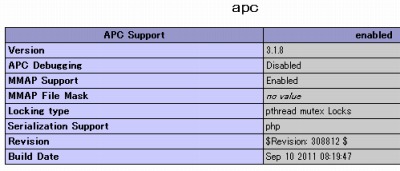
phpinfo() を記載した適当なphp ファイルを動作させると、apc が有効になっていることが確認できる。
php.ini ファイルを参考文献にならってpublic_html に設置したが、それ以下に配置したドメインでtest.php を実行した。php.ini 設置前にはapc が有効ではなかったが、設置後は有効と表示された。この設定は多くのphp に影響を与える可能性があるから、慎重に設置する必要がある。
なお、今回のテストはphpinfo を記載したtest.php のほかに、各ドメインで設置しているWordPress やGallery などは動作した。
※Bluehost はphp 5.2.17 のCGI/FastCGI で動作していた。
参考文献
- Install APC Accelerator On Bluehost Shared Host | RK.md
コメント