# rpm -Uvh otrs-3.0.0-beta6.noarch.rpm

error: Failed dependencies:
perl-Net-DNS is needed by otrs-3.0.0-beta6.noarch
perl-IO-Socket-SSL is needed by otrs-3.0.0-beta6.noarch
# rpm -Uvh otrs-3.0.0-beta6.noarch.rpm
Preparing... ########################################### [100%]
Check OTRS user ... otrs added.
1:otrs ########################################### [100%]
Next steps:
[httpd services]
Restart httpd 'service httpd restart'
[mysqld service]
Start mysqld 'service mysqld start'
[install the OTRS database]
Use a webbrowser and open this link:
[OTRS services]
Start OTRS 'service otrs start' (service otrs {start|stop|status|restart).
((enjoy))
Your OTRS Team
サービスの起動・再起動
# service httpd restart
# service mysqld start
# service otrs start

Starting OTRS..
Checking httpd ... done.
Checking MySQL ... done.
Checking database connect... DBI connect('database=otrs;host=localhost;','otrs',...) failed: Access denied for user 'otrs'@'localhost' (using password: YES) at /opt/otrs/Kernel/System/DB.pm line 210
ERROR: OTRS-otrs.CheckDB.pl-10 Perl: 5.8.8 OS: linux Time: Sun Nov  7 10:04:28 2010

Message: Access denied for user 'otrs'@'localhost' (using password: YES)

Traceback (36384):
Module: Kernel::System::DB::new (v1.124) Line: 181
Module: /opt/otrs/bin/otrs.CheckDB.pl (v1.3) Line: 52

No database connect! Error!
May your database isn't configured yet?

Try the web installer to configure your database:

-->> http://localhost/otrs/installer.pl <<--

or configure your database with README.database (DB - Setup Example)
設定ファイルの編集
vi /opt/otrs/Kernel/Config.pm

# ---------------------------------------------------- #
# database settings                                    #
# ---------------------------------------------------- #
# DatabaseHost
# (The database host.)
$Self->{DatabaseHost} = 'localhost';
# Database
# (The database name.)
$Self->{Database} = 'otrs';
# DatabaseUser
# (The database user.)
$Self->{DatabaseUser} = 'otrs';
# DatabasePw
# (The password of database user. You also can use bin/otrs.CryptPassword.pl
# for crypted passwords.)
$Self->{DatabasePw} = 'some-pass';
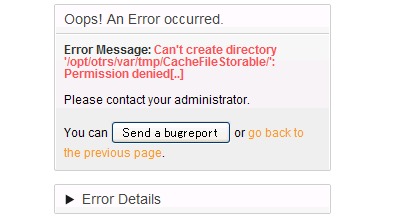
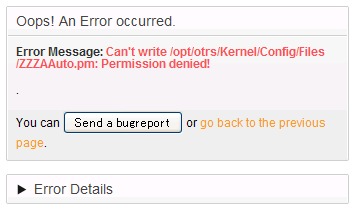
You can Send a bugreport or go back to the previous page.
# mkdir CacheFileStorable
パーミッション設定2
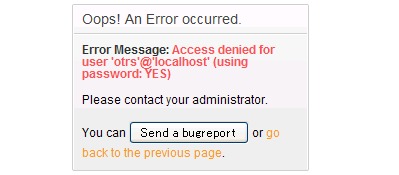
Oops! An Error occurred.
Error Message: Access denied for user ‘otrs’@’localhost’ (using password: YES)
Please contact your administrator.
データベース設定
mysql -u root -e 'create database otrs charset utf8'
mysql -u root otrs < /opt/otrs/scripts/database/otrs-schema.mysql.sql
mysql -u root otrs < /opt/otrs/scripts/database/otrs-initial_insert.mysql.sql
mysql -u root otrs < /opt/otrs/scripts/database/otrs-schema-post.mysql.sql
mysql -u root -e 'GRANT ALL PRIVILEGES ON otrs.* TO otrs@localhost IDENTIFIED BY "some-pass" WITH GRANT OPTION;'
再びサービスの起動
# service otrs start
Starting OTRS..
Checking httpd ... done.
Checking MySQL ... done.
Checking database connect... It looks Ok! done.
Enable /opt/otrs/bin/otrs.PostMaster.pl ... done.
Checking otrs spool dir...  done.
Creating cronjobs (source /opt/otrs/var/cron/*) ...
done.

-->> http://localhost/otrs/index.pl <<--
Final start of OTRS.. done
bin/otrs.SetPermissions.pl <1.3> - set OTRS file permissions

Copyright (C) 2001-2010 OTRS AG, http://otrs.org/
Usage: otrs.SetPermissions.pl
[--otrs-user=<OTRS_USER>]
[--web-user=<WEBSERVER_USER>]
[--otrs-group=<OTRS_GROUP>]
[--web-group=<WEB_GROUP>]
[--admin-user=<ADMIN_USER>]
[--admin-group=<ADMIN_GROUP>]
[--admin-group-writable]
[--secure]
[--not-root]
<OTRS_HOME>
※ServersMan@VPSではApacheではなくdaemonらしいので
# /opt/otrs/bin/otrs.SetPermissions.pl --admin-group-writable --otrs-user=root --otrs-group=root --admin-user=root --admin-group=root --admin-group-writable --web-group=daemon /opt/otrs
bin/otrs.SetPermissions.pl <1.3> - set OTRS file permissions
Copyright (C) 2001-2010 OTRS AG, http://otrs.org/
Setting permissions on /opt/otrs
Setting permissions on /opt/otrs/var
Setting permissions on /opt/otrs/bin/*
Setting permissions on /opt/otrs/scripts/*.pl
Setting permissions on /opt/otrs/scripts/tools/*.pl
Setting permissions on Kernel/Config.pm
Setting owner rw and group ro permissions on /opt/otrs/
Setting owner rw and group ro permissions on /opt/otrs/.procmailrc
Setting owner rw and group ro permissions on /opt/otrs/.fetchmailrc


コメント